
GST and e-invoice
For owners and accountants who prepare GST returns and e-invoices.
The daily problem
Every month the same scramble: sales from one place, purchases from another, a supplier who has not filed, and an invoice that the portal rejects because of a missing pincode. Owners wait for the accountant, and accountants wait for clean data.
What you can do
- Bill with CGST and SGST or IGST worked out from the buyer’s state, with HSN on the invoice. Where no tax applies, issue a bill of supply.
- Keep more than one GST registration, each with its own tax scheme and effective dates.
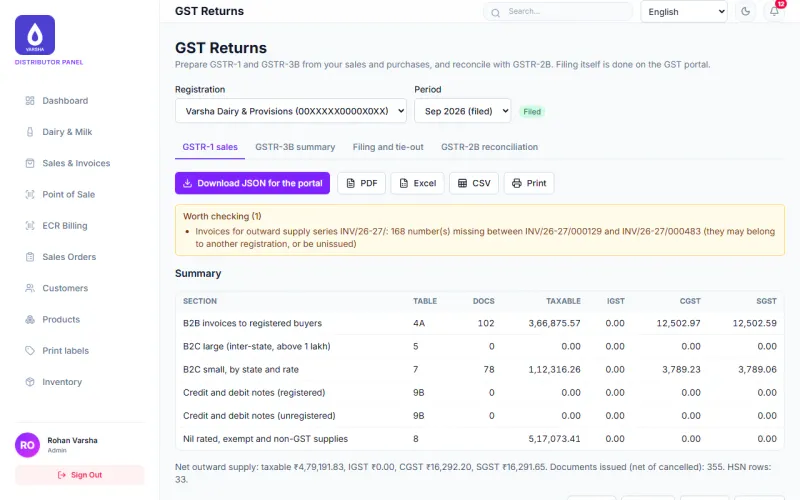
- Prepare GSTR-1 (Beta) and GSTR-3B (Beta) from your own sales and purchases, with checks that tell you what to fix, and download the portal upload files.
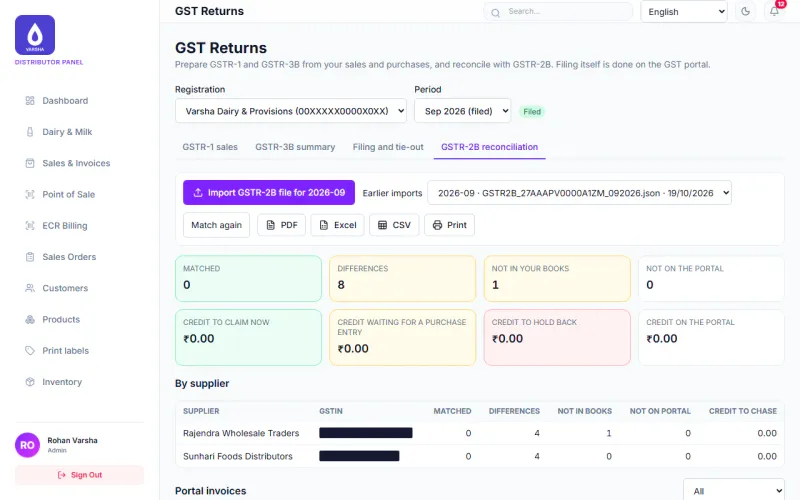
- Match purchases with the GSTR-2B of your suppliers (Beta) and see what does not agree.
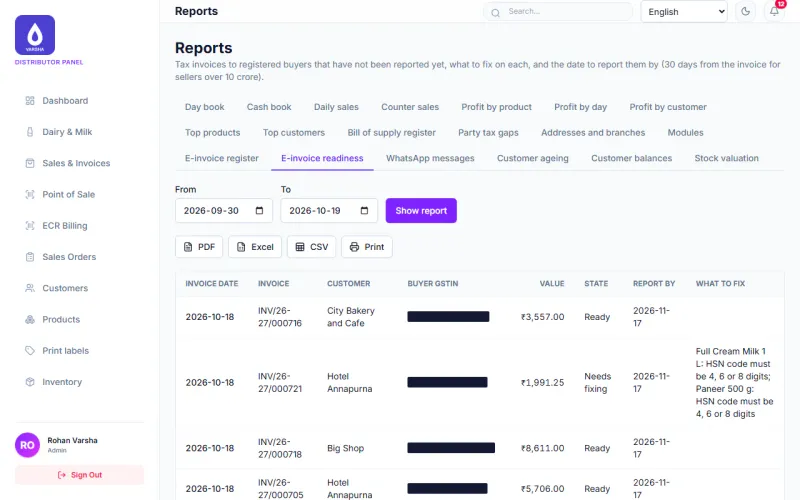
- Check e-invoices before anything is sent (Beta). The page lists exactly what to fix, such as a missing GSTIN or pincode.
- Try the e-invoice steps in test mode (Beta): the app makes a test IRN and QR code itself, and lets you cancel within 24 hours.
- Download the GST reports as PDF, Excel or CSV, or print them.
How a month goes
- Bill through the month. The tax is worked out on every bill.
- Before the due date, open the period and read the checks. Fix what it lists.
- Download the upload files and give them to your accountant.
- Match purchases against GSTR-2B and chase suppliers for what is missing.
What is still in beta
- The GSTR-1 and GSTR-3B upload files have not been tried on the GST portal yet. Check them with your accountant before filing.
- E-invoicing runs in a test mode inside the app. It is not connected to the government portal or its test system, so no real IRN is issued.
- Composition sellers, exports, reverse charge and imports are not built for returns.
Coming soon
- E-way bill for goods on the move.
- Direct GST filing from the app through an authorised GST provider, with your permission.
Questions
Can I file from the app today? No. You download the files and upload them yourself. Direct filing is planned and not built.
Do I need e-invoicing? That depends on your turnover and is your decision with your accountant. The app lets you switch it on for each registration.
Modules to switch on
Each card shows what is ready today. Open a card for the full note.
Billing and sales
AvailableMake bills and tax invoices, take cash, UPI, card or credit, print or download a PDF, and see every sale.
GST Returns
BetaPrepare GSTR-1 and GSTR-3B from your sales and purchases with the portal upload files, and match purchases with GSTR-2B.
The upload files have not yet been tried on the GST portal. Check them with your accountant before filing.
E-Invoicing
BetaCheck B2B tax invoices against the e-invoice rules, make a test IRN and QR code, cancel within 24 hours, and see what is not ready.
Runs in a test mode inside the app. It is not connected to the government portal yet.
E-way bill
Coming soonMake e-way bills for goods on the move from your bills and load sheets.
Direct GST filing
Coming soonFile GST returns from the app through an authorised GST provider, with your permission.
Reports
AvailableDay book, cash book, profit, dues by age, stock value and more. Every report downloads as PDF, Excel or CSV and prints.
What it looks like
See it with your own work
Tell us what you buy, sell and collect each day. We will show you the parts that fit and say plainly which are still in beta.