
Retail POS and billing
For shops and counters that bill fast and print receipts.
The daily problem
The queue is long, the customer wants a bill with GST, and the stock register in the back does not match the shelf. Prices change, labels are written by hand, and at night you count cash and wonder where the difference came from.
What you can do
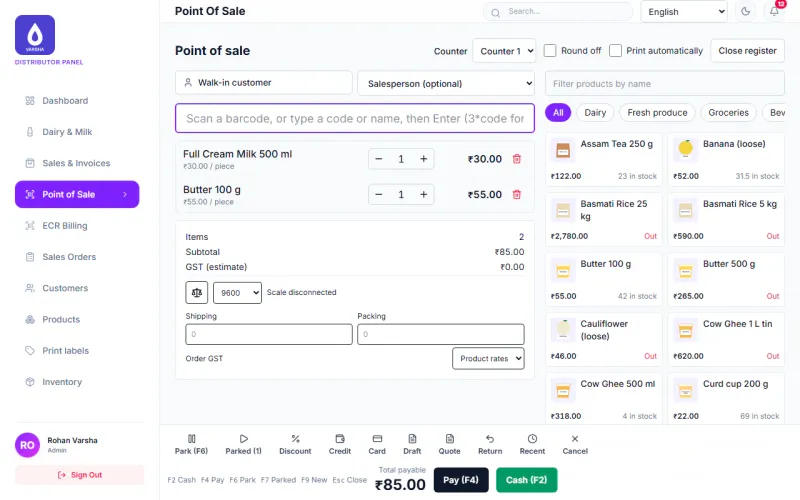
- Scan barcodes, hold a bill while the customer fetches one more item, and take cash, UPI, card, split payments or credit.
- Print a receipt on a 58 mm or 80 mm Bluetooth or USB thermal printer, or download the bill as a PDF. The printing is built for these printers but has not yet been tried on real ones, so tell us your model and we will check it with you before you buy.
- Open a shift with a cash float and close it with a cash count, so a shortage or excess shows up the same day.
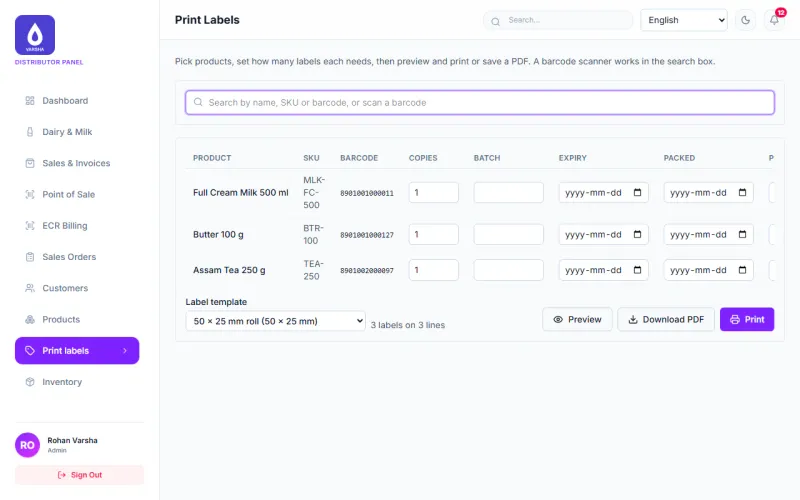
- Design labels with barcodes or QR codes (Beta) and print them as a PDF. Label printers are not yet checked.
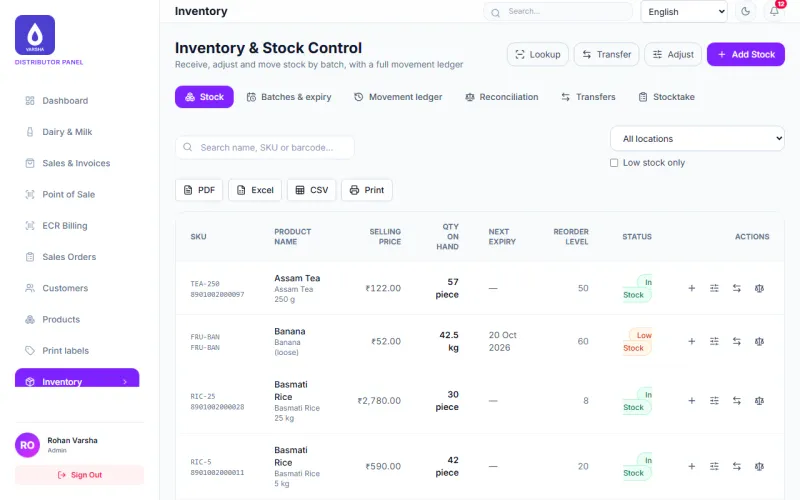
- Keep products with sizes and units, stock in each godown, batches and expiry dates, transfers and stock counts.
- Raise purchase orders, receive goods and record supplier bills and returns.
- Charge CGST and SGST or IGST from the buyer’s state, and issue bills of supply where no tax applies.
- Open the day book, cash book, profit and dues reports. Every report downloads as PDF, Excel or CSV and prints.
- Send a bill as a PDF on WhatsApp, only to people who agreed.
How a day goes
- Open the shift with the cash in the drawer.
- Scan items, bill, take payment and print the receipt. On the Android app, counter sales keep working when the network drops and are sent later.
- Print labels for new stock and put it on the shelf.
- Receive purchases against your orders.
- Close the shift with a cash count and look at the day book.
What is still in beta
- The Android app and the Windows app are in testing. The Windows installer is not signed yet.
- WhatsApp messages are tested with a test provider only.
- Check your printer and label printer model with us before you buy hardware.
Questions
Which printers work? The app is built to print receipts on 58 mm and 80 mm ESC/POS thermal printers over Bluetooth or USB, and labels on TSPL, ZPL or ESC/POS label printers or as a PDF. It has not yet been tried on real printers, so tell us your model and we will check it with you before you buy.
Can several counters sell at once? Yes. Each counter or phone keeps its own bill number series, so two of them are very unlikely to make the same number.
Modules to switch on
Each card shows what is ready today. Open a card for the full note.
Counter POS and ECR
AvailableA fast counter screen with barcode scanning, held bills, shifts with cash count, and a printed receipt.
Billing and sales
AvailableMake bills and tax invoices, take cash, UPI, card or credit, print or download a PDF, and see every sale.
Barcode labels
BetaDesign labels with barcodes or QR codes and print them as a PDF, or on label printers once we have checked your model with you.
Labels are checked as PDF files and previews. They have not been tried on real label printers yet.
Products and stock
AvailableProducts with sizes and units, stock in each godown, batches and expiry dates, transfers and stock counts.
Buying
AvailablePurchase requests, purchase orders, goods received, supplier bills and returns, with supplier dues.
Reports
AvailableDay book, cash book, profit, dues by age, stock value and more. Every report downloads as PDF, Excel or CSV and prints.
WhatsApp Messaging
BetaSend bills and statements as a PDF on WhatsApp, only to people who agreed, with a log of every message.
Tested with a test provider. A live WhatsApp Business account has not been connected yet.
What it looks like
See it with your own work
Tell us what you buy, sell and collect each day. We will show you the parts that fit and say plainly which are still in beta.