
Change the language
What this page is for
You use this page to change the language of the screens. You can choose English, Hindi, Marathi, Gujarati or Punjabi. The web and the phone both have a language choice.
When to use it
- You find another language easier to read.
- Someone else uses the same phone and prefers their language.
Before you start
- Hindi, Marathi, Gujarati and Punjabi are beta. They are drafts made with AI.
- A native speaker has not yet checked them. Some words may look odd or be wrong.
- English is not beta. The other four are.
- Thermal receipts stay in English.
Steps
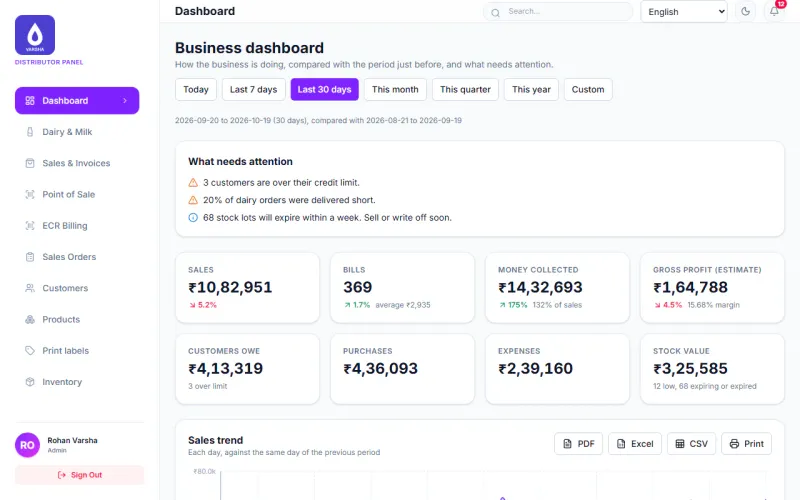
- Sign in on the web.
- Look at the top bar. Find the language box. It shows English at first.
- Click the language box.
- Choose your language. Beta languages show (beta) after the name.
- The screens change to that language at once.
The choice is saved on the server for your user. A new browser then shows it too. You can also choose the language before you sign in. The language box is at the top right of the sign-in screen.
On the phone app
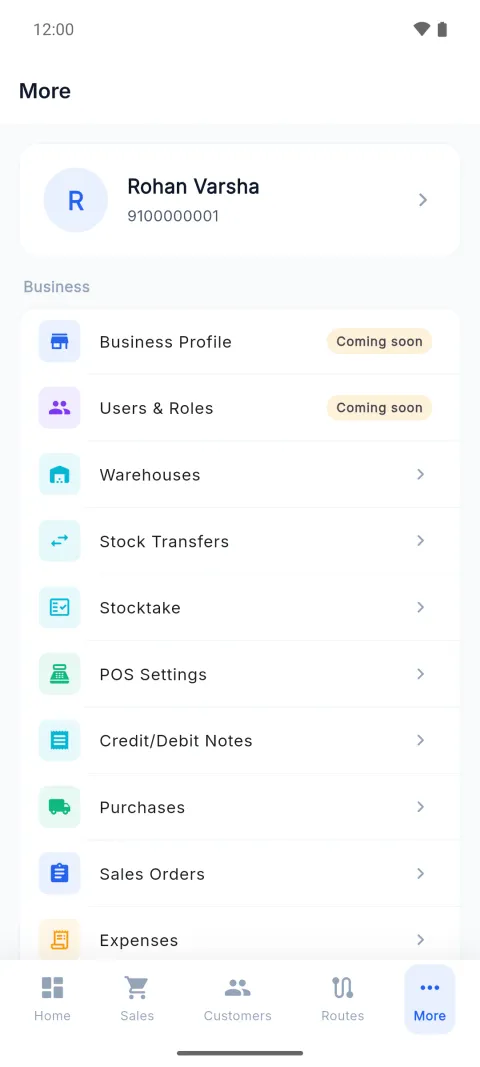
- Tap More at the bottom.
- Scroll to the group App. Tap Language.
- A list opens with a Language heading. Tap your language.
- Beta languages show (beta) after the name.
You can also tap Language at the top right of the first sign-in screen.
Check it worked
The menu names, buttons and headings change to the new language. Words such as GST, UPI, SKU, kg and OTP stay in English letters on purpose.
Common mistakes
- A strange word. In a beta language it can be a draft nobody has checked. Tell your support person.
- Looking for the language in the Settings screen. On the web it is in the top bar. On the phone it is in More.
- Expecting printed receipts to change. Thermal receipts stay in English.
Questions
Which languages can I choose? English, Hindi, Marathi, Gujarati and Punjabi.
When will the beta label go? It goes after a native speaker has checked that language. This page cannot say when.
Related pages
Checked against the app on 2026-10-19 (version 6a6df7a)